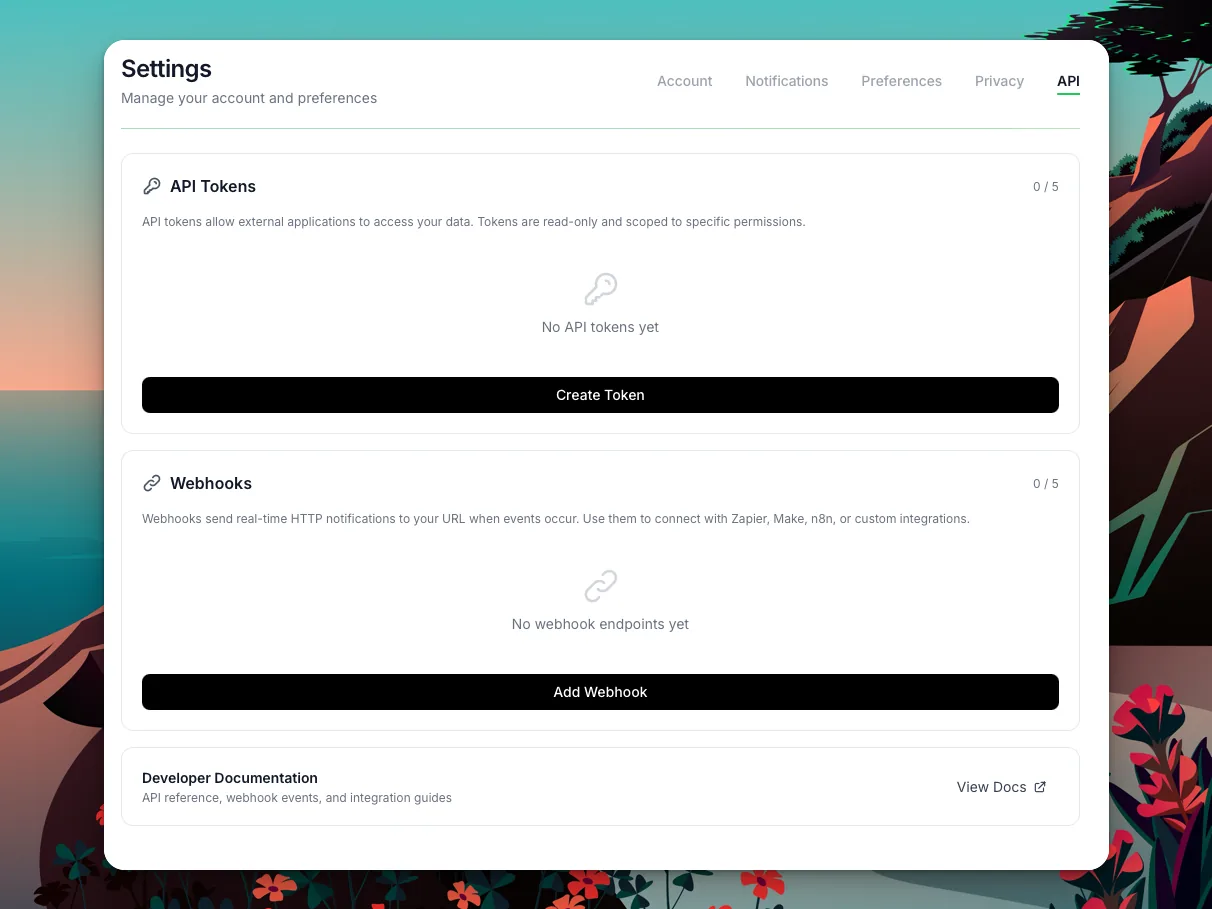
If you've ever wanted to pull your habit streaks into a spreadsheet, trigger a smart-home routine when you finish a focus session, or build a custom dashboard from your personal growth data — today's the day.
I just shipped the Loggd.life Public API and a real-time webhook system. Both available now for Pro subscribers.
It covers every core part of loggd.life: habits, tasks, goals, and focus sessions. Webhooks fire in real time for 15 events. The whole thing is designed so you can go from zero to your first API call in under five minutes.

Why a Public API
Simple: your data is yours. You track habits every day, complete tasks, log focus sessions, work toward goals. That data shouldn't be locked inside one app.
I wanted to give you a way to:
- Pull your data into other tools — spreadsheets, dashboards, automation platforms
- React to events in real time via webhooks — habit completed, badge unlocked, level up
- Build things I haven't thought of on top of your own data
The API is read-only by design. Your data flows out, nothing flows in without your direct action in the app. That's intentional — a safe way to extend loggd.life without worrying about accidental writes.
What You Can Access
The public API lives at https://loggd.life/api/v1/public and covers five resource types, each behind its own permission scope.
Habits and Streaks
Your full habit list, check history, skip records, and calculated streaks.
GET /api/v1/public/habits
GET /api/v1/public/habits/{id}
GET /api/v1/public/habits/{id}/checks
GET /api/v1/public/habits/{id}/skips
Scope required: read:habits
Every habit comes back with its current streak, longest streak, total completions, and the full check/skip history. Streaks are timezone-aware — they match exactly what you see in the app.
Tasks and Subtasks
Your task list with filtering by status, priority, and more.
GET /api/v1/public/tasks
GET /api/v1/public/tasks/{id}
Scope required: read:tasks
Tasks include subtasks, tags, priority, scheduled dates, completion status, and goal associations. Filter by status, priority, or goal_id to get exactly what you need.
Goals and Milestones
Your goals with full milestone and metric tracking data.
GET /api/v1/public/goals
GET /api/v1/public/goals/{id}
GET /api/v1/public/goals/{id}/updates
Scope required: read:goals
Both metric and milestone goal types are supported. Metric goals include current value, target value, and progress percentage. Milestone goals include the full checklist with completion status.
Focus Sessions
Your focus session history and stats.
GET /api/v1/public/focus-sessions
GET /api/v1/public/focus-sessions/{id}
Scope required: read:focus
Each session includes duration, associated task or habit, tags, pause history, and completion status. Great for building custom time-tracking reports.
Profile and Gamification
Your level, XP, badges, and activity data.
GET /api/v1/public/profile
Scope required: read:profile
Returns current level, XP, tier, earned badges, and public profile info. Useful for building "life dashboards" or sharing progress programmatically.
Real-Time Webhooks
Polling works for dashboards. But if you want to react to events as they happen, webhooks are the way.
Set up a webhook endpoint from Settings > API, pick the events you care about, and loggd.life sends a signed POST request to your URL every time one fires.
Available Events
| Category | Events |
|---|---|
| Habits | habit.completed, habit.created, habit.archived |
| Tasks | task.completed, task.created, task.cancelled |
| Goals | goal.completed, goal.created, goal.progress_changed, goal.milestone_reached |
| Focus | focus_session.completed, focus_session.started |
| Gamification | badge.unlocked, level.up |
| Check-ins | checkin.completed |
15 events covering the full lifecycle of your personal growth activity.
Payload Format
Every webhook delivery follows the same envelope:
{
  "event": "habit.completed",
  "version": 1,
  "timestamp": "2026-04-14T09:30:00+00:00",
  "data": {
    "habit_id": 42,
    "name": "Morning meditation",
    "streak_current": 15,
    "streak_longest": 30,
    "checked_date": "2026-04-14"
  }
}
The version field is for schema changes. Right now it's always 1. If I ever change a payload shape in a breaking way, I'll bump it to 2 and give you time to migrate.
Security: HMAC-SHA256 Signatures
Every delivery includes an X-Loggd-Signature header — an HMAC-SHA256 hash of the request body, signed with your webhook's secret key. Always verify this before processing the payload.
import hmac, hashlib

def verify_signature(payload_body, signature, secret):
    expected = hmac.new(
        secret.encode(),
        payload_body,
        hashlib.sha256
    ).hexdigest()
    return hmac.compare_digest(f"sha256={expected}", signature)
You can rotate your webhook secret at any time from Settings without recreating the endpoint.
Delivery Guarantees
- Automatic retries: Failed deliveries (non-2xx or timeout) are retried up to 5 times with exponential backoff (1 min, 5 min, 15 min, 1 hour)
- Delivery log: Every attempt is logged with status code, response time, and payload — check the history from Settings to debug issues
- Test button: Send a test event to your endpoint before going live, right from webhook settings
How Authentication Works
The API uses Bearer token authentication via Laravel Sanctum.
Creating a Token
- Go to Settings > API in your loggd.life account
- Click Create Token
- Select the scopes you need (e.g.,
read:habits,read:tasks) - Copy the token immediately — it's only shown once
Making Requests
Include the token in every request's Authorization header:
curl -s https://loggd.life/api/v1/public/habits \
  -H "Authorization: Bearer YOUR_TOKEN" \
  -H "Accept: application/json"
Scopes
Tokens are scoped so you only grant the access you need:
| Scope | Access |
|---|---|
read:habits |
Habits, checks, skips, streaks |
read:tasks |
Tasks, subtasks |
read:goals |
Goals, milestones, metrics, updates |
read:focus |
Focus sessions |
read:profile |
Profile, level, badges |
You can create up to 5 tokens per account, each with different scopes. One token for your Zapier automation that only reads habits, another for your personal dashboard that reads everything.
What Happens If You Downgrade
If you downgrade from Pro, your tokens aren't deleted. They just return 403 requires_pro until you re-subscribe. Webhooks are paused, not removed.
What You Can Build
Some real use cases that work today.
Zapier and n8n Automations
Connect loggd.life to 5,000+ apps through Zapier or n8n:
- Habit completed > Slack message ("Just hit day 30 of meditation!")
- All daily habits done > Smart light turns green (via Philips Hue webhook)
- Focus session completed > Log hours to Toggl or a Google Sheet
- Badge unlocked > Tweet it automatically
Webhooks as the trigger, automation platform handles the rest.
Personal Dashboards
Pull your data into Grafana, Notion, or a custom web app:
- Habit streaks and completion rates over time
- Task throughput by week (created vs. completed)
- Focus hours by day, week, or month
- Goal progress across all life areas
The API gives you everything you need to build the exact view you want — not the one I designed.
Quantified Self Data Aggregation
If you're tracking health in Apple Health, finances in YNAB, and habits in loggd.life, the API lets you pull your growth data into a unified dataset. Combine it with QS Ledger or your own scripts for a full picture.
Custom Notifications and Alerts
Build alerts the app doesn't offer natively:
- Ping yourself if you haven't checked in a habit by 8pm
- Weekly email summary of your top metrics
- Alert your accountability partner when you hit a streak milestone
Developer Portfolios and Blogs
Show your progress on your personal site. Pull live streak data, badge counts, or focus hours and display them as widgets. The read:profile scope gives you level, XP, tier, and badge data — perfect for "life stats" cards.
Getting Started in 5 Minutes
Fastest path from zero to your first API call.
Step 1: Make sure you're on a Pro plan. API access is a Pro feature.
Step 2: Go to Settings > API and create a token with read:habits scope.
Step 3: Make your first request:
curl -s https://loggd.life/api/v1/public/habits \
  -H "Authorization: Bearer YOUR_TOKEN" \
  -H "Accept: application/json" | python3 -m json.tool
Step 4: You should get back a JSON response with your habits:
{
  "data": [
    {
      "id": 1,
      "name": "Morning meditation",
      "tracking_mode": "check",
      "frequency": "daily",
      "streak_current": 15,
      "streak_longest": 30,
      "total_completions": 142,
      "created_at": "2026-01-15T00:00:00+00:00"
    }
  ]
}
Step 5 (optional): Set up a webhook for habit.completed to get real-time notifications when you complete a habit. Go to Settings > API > Webhooks, add your URL, pick the events, hit Test to verify.
That's it. You're in.
Rate Limits and Stability
Rate Limits
The public API allows 300 requests per minute per token. Each token has its own bucket, so multiple integrations don't compete with each other. Hit the limit and you'll get a 429 Too Many Requests with a Retry-After header.
Versioning
All public endpoints are under /api/v1/public. The v1 contract is additive only — I may add new fields to responses, but I won't remove or rename existing ones. If a breaking change is ever needed, it goes under /api/v2/public and v1 keeps working.
Pagination
Collection endpoints use cursor-based pagination. Pass the id of the last item as the after parameter:
curl -s "https://loggd.life/api/v1/public/habits?limit=20&after=42" \
  -H "Authorization: Bearer YOUR_TOKEN"
Responses include a has_more boolean so you know if there's more. Default page size is 50 items, configurable from 1 to 100 via the limit parameter.
What's Next
This is v1 — read-only access and real-time webhooks. Here's what's on the roadmap:
- Write scopes (
write:habits,write:tasks) for creating and updating data via API - Additional endpoints for analytics, daily check-ins, and notes
- OAuth2 flow for third-party app integrations
- Official Zapier integration with pre-built triggers and actions
I'm building based on what you tell me you need. Got a use case that isn't covered? Let me know.
Frequently Asked Questions
Does loggd.life have an API?
Yes. As of April 2026, loggd.life has a public RESTful API covering habits, tasks, goals, focus sessions, and profile data. Bearer token auth, JSON responses. Real-time webhooks for 15 event types.
Is the API free?
It requires a Pro subscription. Free accounts can use every feature in the app, but programmatic access (API tokens and webhooks) is Pro-only. If you downgrade, your tokens and webhooks are preserved but paused until you re-subscribe.
Can I use the loggd.life API with Zapier?
Yes. Use webhooks as triggers in Zapier — set up an endpoint in loggd.life, then use Zapier's "Webhooks by Zapier" trigger to catch events. For reading data, use Zapier's webhook action to call the API endpoints directly with your Bearer token.
What data can I export through the API?
Everything you see in the app: habits with full check/skip history and streaks, tasks with subtasks and metadata, goals with milestones and metric progress, focus sessions with duration and associations, and your profile with level, XP, and badge data.
How do webhooks work?
When something happens in your account (completing a habit, unlocking a badge), loggd.life sends a signed HTTP POST to your configured URL. The payload includes the event type, timestamp, and relevant data. Failed deliveries are retried automatically, and every attempt is logged so you can debug.
Is my data safe?
Tokens are read-only, hashed at rest, and scoped to specific permissions. You control which data each token can access. Webhook payloads are signed with HMAC-SHA256 so you can verify they came from loggd.life. Revoke any token or delete any webhook instantly from Settings.
What about rate limits?
300 requests per minute per token. Each token gets its own bucket, so your Zapier integration won't starve your dashboard. Plenty for any automation or reporting workflow.
Start Building
The API is live. Docs are at loggd.life/developers. Your data is waiting.
Get a Pro account, grab a token, and build something only you would think of.