A goal setting sheet turns an idea into a clear result, a deadline, and actions you can put on your calendar. Copy the worksheet below, then use the completed example to fill in your own.
The sheet connects a goal statement and success metric to milestones, recurring habits, one-off tasks, focus time, and a review date. That connection matters: a deadline is easier to act on when you know what to do next and when you will check your progress.
Copy it into Word, a spreadsheet, or a notebook, or print this page. You do not need a long reflection exercise. Aim to finish with one next action and a scheduled review.
Copy This Goal Setting Sheet
| Field | Your Answer |
|---|---|
| Goal statement | By [date], I will [result], measured by [metric]. |
| Why this matters now | I want this because [reason it matters at this time]. |
| Starting point | Today, I am at [current amount, status, or starting condition]. |
| Success metric | I will know I finished when [observable result or quantity]. |
| Target date | [Month Day, Year] |
| Milestones and dates | [Intermediate result] by [date]; [next result] by [date]. |
| Weekly actions | Each week, I will [specific action] on [days or number of times]. |
| Recurring habit and cue | After [existing activity], I will [small action] on [days]. |
| Next one-off task | [Verb] [specific deliverable] by [date]. |
| Priority | [High, medium, or low]. This comes before [optional task] because [reason]. |
| Focus session | Work on [specific task] for [minutes] at [time/place]. |
| Progress record | Record the date, action completed, and current outcome measure: [where or how]. |
| Weekly review | [Day and time] each week: compare [measure] with [milestone]. |
| Likely obstacle | [Specific obstacle] may interrupt [action]. |
| Missed-day response | If I miss [action], I will [smaller action or new time] and keep my completed work. |
| Next decision | At the review, decide whether to [continue, adjust the action, change the date, or reduce scope]. |
To use the sheet, select the table and copy it into Word or a spreadsheet. In a notebook, recreate the field labels and leave space beside each one for your answer. Use your browser’s print command to print the page or save it as a PDF.
Start with the goal statement, success metric, target date, and next one-off task. Those four answers give the idea a clear finish and a first move. Then add the milestones, weekly actions, habit cue, and review details as you work through the example below. Keep answers short enough that you can scan the sheet before starting a work session.
Should You Use PDF, Word, Excel, or an App?
| Format | Best Fit | Updating and Sharing | Long-Term Tracking |
|---|---|---|---|
| PDF or paper | A stable layout you can print and keep visible. Use handwritten check-ins. | Easy to mark by hand; changes, totals, and reminders need a separate routine. | Useful as a dated record if you keep completed sheets together. |
| Word or another editable document | Goals that need explanatory notes or an employee discussion. | Easy to revise; shared editing depends on where the document is stored. | Keeps context and comments, but dated progress entries may take manual organization. |
| Excel or another spreadsheet | Dated entries, totals, and comparing planned actions with completed ones. | Collaboration depends on the file’s sharing setup; reminders need a separate setup. | Rows can preserve a running record and make quantities easier to compare. |
| Digital goal tracker | Frequent updates alongside tasks and habits. | Check device access, sharing permissions, and notification options before choosing an app. | Check what history the app keeps and how you can review it over time. |
Use paper for a visible desk copy, a document for discussion, a spreadsheet for calculations, and a tracker for ongoing action records. Choose the format you will actually update, not the one with the most fields.
You can make a goal setting template PDF by copying the worksheet into a document and using your browser’s print command to save a PDF. To make a goal setting template Word document, paste the table into Word and adjust the row heights for your answers. To make a goal setting template Excel sheet, paste the field names into one column and your answers into the next. These are ways to create your own copy from the worksheet above, not separate downloads.
Write a SMART Goal You Can Actually Check
SMART goals describe a specific result, a measurable finish, an achievable scope, a relevant reason, and a time-bound target. The format is useful when it turns a broad wish into something you can check on a calendar and against a clear measure.
Locke’s goal-setting theory holds that specific goals direct activity more effectively than vague or general goals. To make a behavior measurable, the University of Minnesota recommends recording how often or how many. For example, “practice” becomes “practice the presentation twice each week.”
Keep the outcome measure separate from the action measure. A completed portfolio is an outcome; the drafting sessions are actions that may help produce it. Finishing the sessions does not, by itself, mean the portfolio is finished. Define what counts as accepted or complete before you begin.
For an employee goal, that might mean delivering a documented onboarding checklist by an agreed date, with the manager’s review confirming it is ready to use. For a student, it might mean finishing a draft and checking it against the assignment requirements before the deadline.
For a personal savings goal, use the structure “Save [amount] for [expense] by [date].” The sinking fund planner can help calculate contributions toward that target. If your goal statement still feels vague, use the SMART goal worksheet to work through it.
Before you commit to the target date, check your calendar. Count the work periods you can actually use and compare them with existing commitments. If the available time does not fit the goal, adjust the scope or date now.
A Completed Personal Goal Setting Sheet
Nina wants to finish a 240-page professional development book in four weeks and write a one-page summary she can use at work. She fills in the same worksheet fields this way:
| Field | Nina’s Answer |
|---|---|
| Goal statement | By the end of four weeks, finish the 240-page book and write a one-page summary for work. |
| Why this matters now | I want to use the book’s ideas in my current work. |
| Starting point | Page 0. |
| Success metric | Reach page 240 and complete the one-page summary. |
| Target date | The date four weeks after I start. |
| Milestones and dates | Page 60 by the end of week 1; page 120 by the end of week 2; page 180 by the end of week 3; page 240 and the summary by the end of week 4. |
| Weekly actions | Read four sessions of 15 pages each: 4 × 15 = 60 pages per week. Over four weeks, 60 × 4 = 240 pages. Draft and finish the summary during week 4. |
| Recurring habit and cue | After dinner on Monday through Thursday, open the book and read the next 15 pages. |
| Next one-off task | Get the book and place it beside my usual reading chair. |
| Priority | Finish the planned reading before optional notes or extra research. Treat the summary as a separate priority in week 4. |
| Focus session | Work on reading the next 15 pages for 25 minutes at my reading chair after dinner. Adjust the block after observing my actual reading pace. |
| Progress record | After each session, record the date, pages reached, one useful note, and the current outcome measure. |
| Weekly review | Check progress on Friday, compare the page count with the milestone, and choose any makeup session before the next week begins. |
| Likely obstacle | An evening commitment may replace a planned reading session. |
| Missed-day response | Move the unfinished pages into an available weekend session. If the available time no longer fits, revise the target date. Keep the pages already read. |
| Next decision | On Friday, choose the time for any makeup session and confirm the next week’s four reading blocks. |
The 25 minutes is time reserved on the calendar, not an assumed reading speed. The page target is what Nina measures; after a few sessions, she can adjust the focus block to match her actual pace. She records both pages reached and a useful note, so the log shows progress as well as ideas she may use.
If you are setting a reading goal for your own book, use the reading goal calculator to work out a daily page target. Nina’s Friday review gives her a specific decision to make before the next week starts.
Turn Action Steps Into Tasks, Habits, and Focus Time
A useful goal sheet gives you a decision for an ordinary day. Instead of leaving “work on goal” in an action list, turn the next milestone into work you can start at a known time. The University of Minnesota recommends dividing ambitious goals into small, realistic steps.
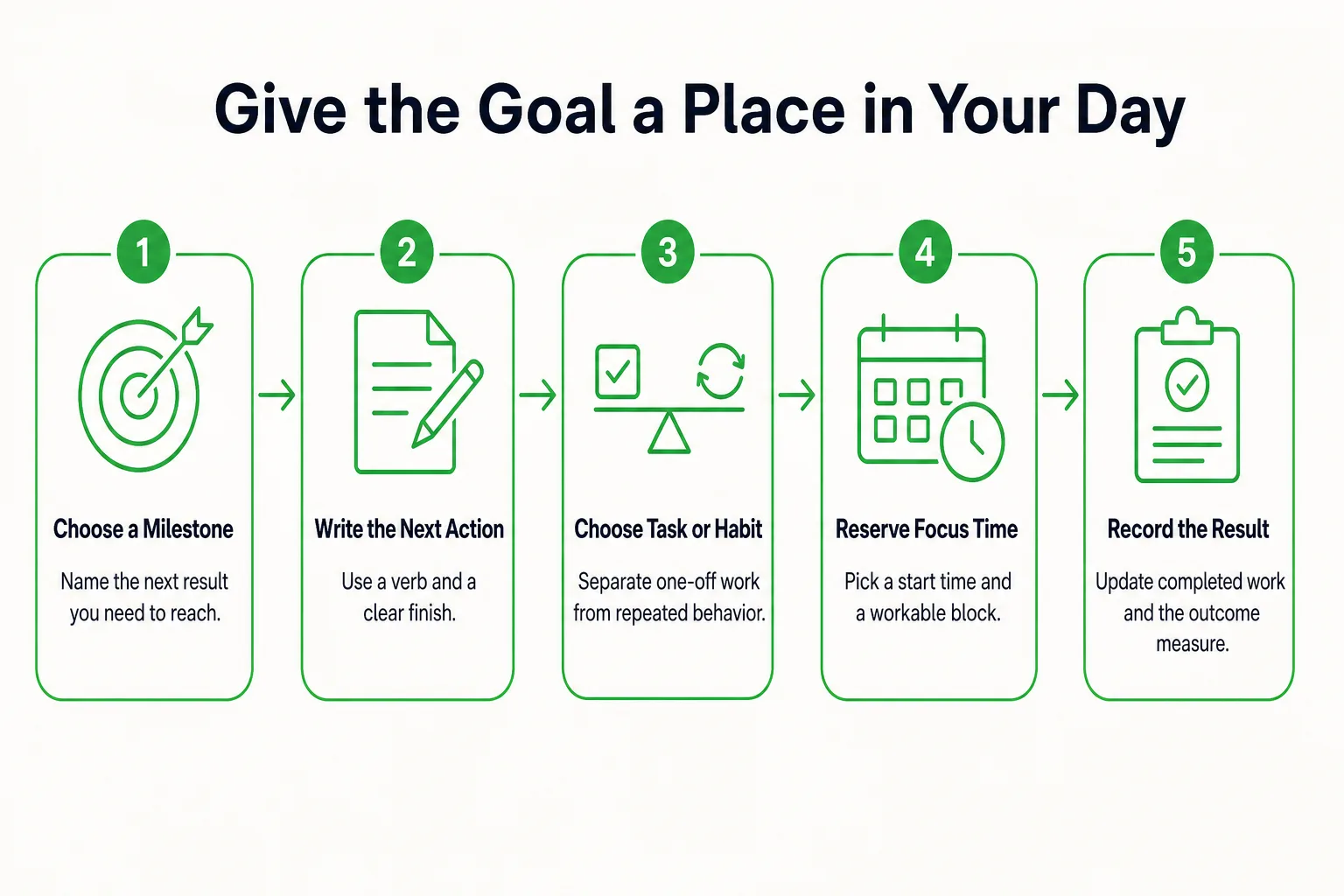
- Choose the next milestone. Use the nearest result on your sheet, such as reaching page 60 by the end of week 1.
- Name the next visible action. Write what you will do, not just the project name. “Read the next 15 pages” gives you a clear start; “book project” does not.
- Decide whether it is a one-off task or a recurring habit. Getting the book is a task. Opening it after dinner Monday through Thursday is a habit cue. Reading the next 15 pages is the work inside each focus block.
- Give the task a priority. Put the action that advances the next milestone ahead of optional polishing or extra research. A task title can use a verb and a deliverable, such as “Draft the summary’s three main points.”
- Reserve focus time. Choose a time and place for the work, then give it a realistic block. If you want a simple way to time a session, start with the browser stopwatch. It can time the block; keep your goal record separately.
- Record the result. Note what you completed and update the measure that shows where the goal stands.
Before the day begins, check three things: what you will do, when you will start, and what you will record when you finish. That turns the sheet from a static list into a working plan.
Use a Weekly Review to Update the Sheet
Weekly Review Checklist
Use this short review once a week to keep the sheet current:
- Update the outcome measure, such as pages read or the result completed.
- Compare your current position with the next milestone.
- Review which planned actions you completed.
- Name the main obstacle, if there was one.
- Choose next week’s priority and schedule it.
- Put the next review on your calendar.
When evaluating a new strategy, the U.S. Department of Health and Human Services recommends assessing what is working and what is not. Keep the review practical: daily, record what you did; weekly, decide when the next actions will happen; monthly, check whether the goal still deserves its current scope.
Nina’s first milestone is 60 pages by the end of week 1. If she reaches page 45, she records page 45 and the 15-page gap, then decides where the remaining reading can fit. She does not erase the pages she finished or silently carry the gap into the next week. If the available time no longer fits, she can revise the schedule or target date.
If actions are getting done but the result is not moving, pause before adding more sessions. Check whether the action is relevant, whether the work is good enough for the intended result, or whether the milestone is defined clearly. A goal countdown timer can show the time remaining before a milestone, but it does not measure the work completed.
End the review with a dated next action, such as “Read pages 46-60 Saturday at 10 a.m.” A specific appointment gives the plan somewhere to go.
Restart After You Stop Using the Sheet
A missed week does not erase the work you already did. Restart by updating the sheet, not by pretending the original schedule still fits.
- Keep the completed work and record your current position.
- Identify what made the plan hard to follow: the timing, the size of the action, or the goal’s scope.
- Make the next action smaller if needed.
- Put a new work period on the calendar.
- Recalculate the remaining work against the time left.
If Nina misses a week, she keeps her page count. At her next available session, she restarts with five pages, then checks how many pages remain and how much time is left. She can decide whether a revised reading pace fits her schedule.
Choose the adjustment that matches the problem. Reduce the scope if the full result is no longer needed. Move the deadline if it is flexible. If the deadline is fixed, decide what lower-priority work can give way to make room. Record the old target, the new target, and the reason for the change so the revised goal does not look like the original one was completed.
If avoidance is tied to a specific feared consequence, the fear-setting exercise can help you write down prevention and repair options. Use it when that reflection would help clarify your next move.
Schedule one small commitment today: a brief session, a first step, or a time to review the revised plan.
Keep a Year View Without Losing the Actual Goal
A year view can show when you followed the planned routine, while a separate outcome record shows what the goal produced. Mark days when the planned action happened, then keep milestone results in a dated list. NIDDK says tracking progress can help people spot strengths and areas to improve; a grid is one way to see activity patterns, not proof that a particular goal is complete.
Once a month, scan for patterns worth checking, such as evening sessions that keep getting missed or a gap during travel. Compare the pattern with your calendar before deciding why it happened. A blank day means different things depending on the schedule: if it was a planned rest day, it does not need to count as an unfinished task.
For Nina, session marks show whether she kept her reading routine. Her page milestones and finished one-page summary show whether she met the goal. Keep those measures distinct. If she starts a new goal partway through the year, begin its activity view on the current date and retain earlier completed goals in the record.
Put Your Goal Setting Sheet Into Practice With Loggd
Use the worksheet to decide what belongs in your goal record, then connect that result to the work you do each day. In Loggd, start by adding the goal you are pursuing. Keep its success metric in your worksheet or review notes so you can check the actual result yourself.
Put one-off actions in the task list. Give each task a priority, and add tags when they help you sort or find related work. For recurring actions, set up a flexible habit schedule. When an action needs uninterrupted attention, use the focus timer for that work period. Tasks and focus sessions connect with goals, keeping related work together.
Use the daily check-in as a regular point to look at the day’s work and decide what comes next. You can mark an action completed, then check your goal’s outcome measure during your review. The check-in supports the routine; it does not replace your own measure of whether the goal is finished.
Each day you check off fills a grid of your last 365 days, so you can see activity across the year at a glance. Treat that view as a record of activity, not proof that a particular goal was completed. Your dated milestones and success metric show that result.
Loggd is free on iPhone, Android, and the web, with no credit card needed. Start with one goal, its next action, and the day you plan to do it.
Goal Setting Sheet Questions
How do I create a goal tracker in Excel?
Make columns for the date, planned action, completed action, current outcome measure, and notes. Add a separate milestone list with each target and date, then update the tracker after each work session and compare your progress with the next milestone during a weekly review.
How many goals should I work on at a time?
Choose a number that leaves enough time to take the next action on each goal alongside your existing commitments. If several goals compete for the same hours, start with the one that matters most now, or make one goal the priority and keep the others on hold until you have room.
What goals can I set with my child this year?
Choose a goal your child can help define, such as reading a book together, practicing a skill, or getting ready for school with less help. Agree on what finished means, pick a small action that fits the family’s routine, and review progress together at a set time. Adjust the action if it proves too large or does not fit the schedule.
Sources
- Locke’s theory of goal setting
- Guide to Goal Setting and Tracking
- Make a Plan to Get Students Moving
- Changing Your Habits for Better Health