A focus timer gives you a set period to work on one task, followed by a break. To use a focus timer for work or study, choose a clear stopping point, start the countdown, and check what you finished before beginning another session.
You can use a focus timer online in your browser or choose a focus timer app. Start with an interval that feels workable, then adjust it to the task and your energy. A timer records elapsed effort. A finished draft, solved problem, or tested change shows what that effort produced. Before you start, decide what you want to have done when the timer ends.
Give Your Focus Session One Clear Task
- Choose one priority. Pick a task from your list that deserves this session. If several tasks compete, choose the one that matters most today, not the one that is easiest to start.
- Turn it into a visible next action. “Study chemistry” is too broad to guide a work interval. “Answer the practice questions for the section on acids” tells you what to do. For work, replace “work on proposal” with “draft the scope section.”
- Set a stopping point. Decide what finished means for this session. It might be answering a set of questions, drafting one section, or testing one change. If the project is too large for one interval, choose a useful piece instead of promising to finish the whole thing.
- Open the timer and begin. Open the browser focus timer when you have chosen the task you want to work on.
Keep unrelated tasks in a parking list, not in the middle of your session. If another idea comes up, write it down and return to the selected action until the interval ends. That gives you one clear thing to finish and a useful result to check afterward.

Set Work Intervals and Breaks You Can Repeat
A useful starting point is 25 minutes of work followed by a 5-minute break, as the University of Washington recommends. That is one option, not a test you have to pass. Try a shorter or longer interval and judge it by whether you can stay with the task and return after the break.
| Work interval | Break | When to try it |
|---|---|---|
| 10 minutes | 3 minutes | When you are getting started, tired, or facing a task you have been putting off |
| 25 minutes | 5 minutes | As a familiar starting point for study or focused work |
| 52 minutes | 17 minutes | When the task and your energy suit a longer stretch; Duke University gives 52 minutes of work and 17 minutes of break as an example of adapting intervals |
The length of a break and the point at which you pause are related, but they are not the same choice. The University of Washington advises taking breaks at least every 45 to 60 minutes, ideally more often. Use your own interval to organize the work, and take a break before you have pushed past your ability to focus.
During a short break, stand up, get water, or look away from the screen. After several rounds, plan a longer break before deciding whether to continue. If a bell repeatedly cuts through useful concentration, try the Flowtime technique, which lets you work without a fixed timer interval. If the same interval feels manageable in the morning but draining later, use a one-week energy review to notice the pattern before changing your whole schedule.
Set Up Your Space Before You Press Start
Open the materials you need before starting. Silence nonessential notifications, and put your phone out of reach if you are using another device as the timer. The fewer reasons you have to stop and adjust things, the easier it is to stay with the task.
Try silence, ambient sound, or instrumental music and choose what feels comfortable. Themes and appearance are preferences, not evidence that a timer will work better. You can use the focus sound mixer to try a background sound, or read what the evidence says about focus sounds before choosing between options.
The CDC lists reduced attention or concentration among fatigue’s effects. If you are tired, shorten your next interval or take a real break instead of adding more stimulation. Set up once, then get to work.
Connect Sessions to a Goal and a Weekly Plan
A useful commitment names the behavior, fits an ordinary week, and gives you a way to restart after a missed day. Connect each session to a goal by deciding what the work should produce before you start.
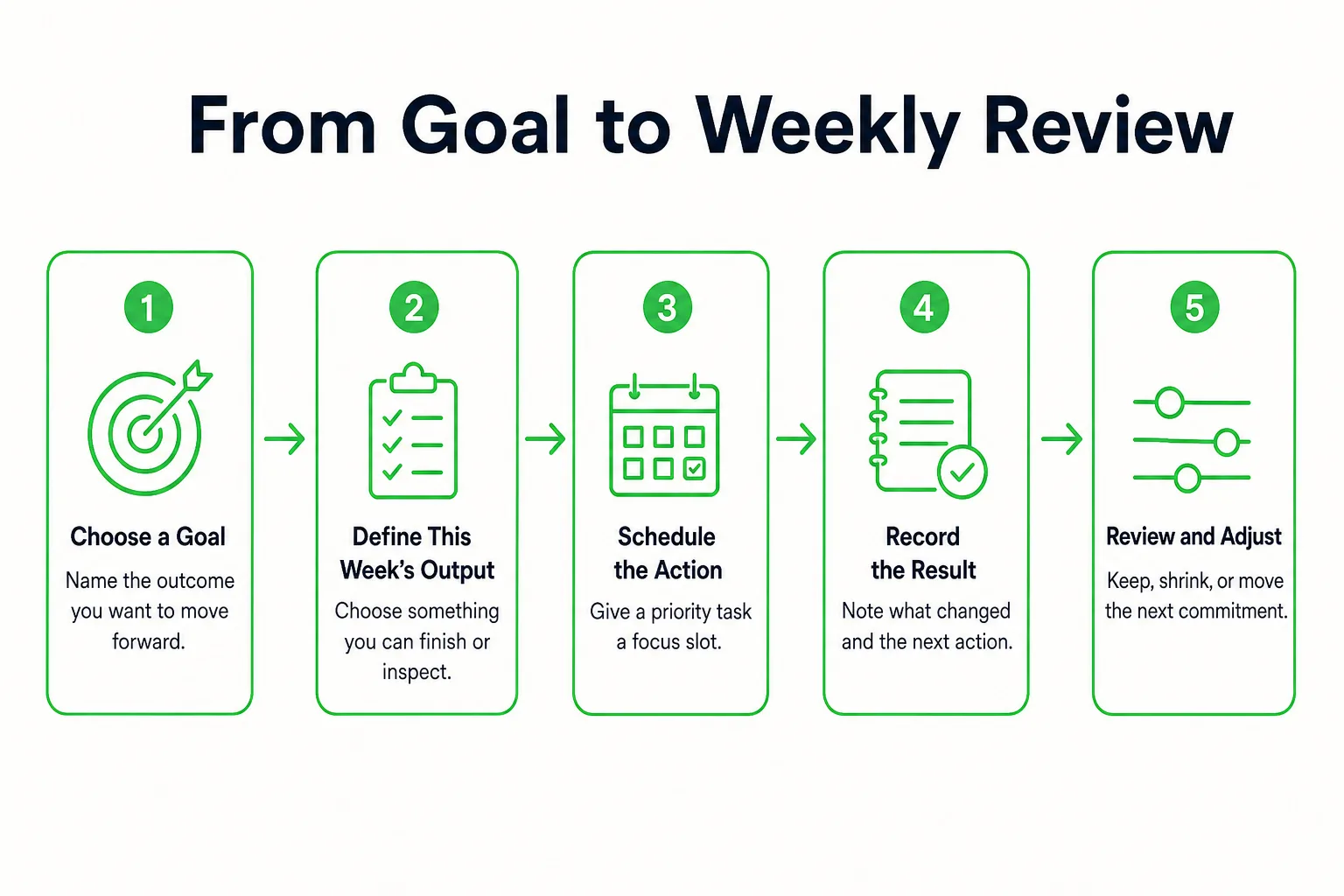
Copy this template and fill it in for the week:
- Goal:
- This week’s deliverable:
- Recurring habit:
- Priority task:
- Focus slot:
- Session result:
- Missed-day fallback:
For example, Jordan wants to submit a certification application. The weekly deliverable is a draft of the experience statement. The recurring habit is opening the application after breakfast on Tuesday and Thursday. Jordan’s first priority task is listing relevant projects.
The first focus session has a concrete output: draft one project description. Afterward, Jordan records what was completed and names the next action, such as drafting the description for another project. This makes it clear how the session connects to the application goal.
If Tuesday’s session gets missed, the fallback is to use the next available slot and choose a smaller next action. It is not to add every missed session to Wednesday. At the weekly review, compare completed outputs with the goal. If sessions are happening but the deliverable is not moving, adjust the task, timing, or scope. If you struggle to reserve time, use the difference between timeboxing and time blocking to decide how to place sessions on your calendar.
Read Your Year Without Confusing Activity With Results
Use a year-at-a-glance record alongside session notes and completed work. A checked day shows recorded activity; it does not show the quality or amount of work you did. Once a month, look for runs of activity, gaps, and changes in routine, then compare those patterns with finished tasks or goal milestones.
A busy stretch might show many recorded sessions while a draft remains unfinished. The next move is to narrow the task or remove a blocker, not to make every timer longer. During a sparse stretch, ask whether the planned habit fit your actual week, then choose a smaller action to restart.
A 365-day progress grid helps you see the shape of a year. Session results help you see what moved forward. Read them together, but do not treat every filled square as focus minutes or a completed goal.
Use Rewards to Support Work Worth Finishing
Keep streaks, points, levels, badges, challenges, and leaderboards in a supporting role. They can give you another reason to return, but the useful measure is still whether your work moved something you care about forward.
Before starting a session, name its useful output. Then do that work before thinking about any score or streak. If you are choosing between opening several extra short sessions to keep a counter moving and tackling the next difficult task that advances your goal, choose the task.
A missed day does not need a catch-up target. Return to the next planned action and make it small enough to start. At your weekly review, ask what you finished before looking at a streak or score.
Connect Focus Sessions to Daily Progress With Loggd
You can keep a goal and the work that supports it together in Loggd. Create the goal, add a task with a priority and tags, then use the focus timer for a session on that task. Tasks and focus sessions can connect with the goal, so you can review the work in context.
For recurring work, add a habit and choose a schedule that fits your week. Use the daily check-in as a prompt to review the day: what did you work on, and what is the next action? You can track a few habits this way, or plan a fuller week with tasks, goals, habits, and focus sessions.
Each day you check off fills a square in the grid of your last 365 days. It gives you a year at a glance, while your task results show what the sessions produced. Loggd also includes points, 100 levels, streaks, badges, and a leaderboard if you want those game elements alongside your progress. It is free on iPhone, Android, and the web, with no credit card needed.
Focus Timer Questions
What is the best focus timer for studying or deep work?
Choose a timer that lets you set a work interval and take a break, then connect each session to one clear task. The University of Washington recommends a 25-minute work session followed by a 5-minute break as a starting point; adjust the intervals to fit your task and energy.
Can I use a focus timer online for free without signing up?
Yes. You can use the browser focus timer without signing up. Choose a task and a work interval, start the countdown, and use the break to step away before deciding whether to begin another session.
Should I use a simple timer or a full productivity app?
Use a simple timer if you only need a countdown and a break. Choose a full productivity app if you also want to organize tasks, habits, and goals with your focus sessions, and review your progress over time.