
The best productivity apps for students help you see what is due, choose your next study task, and make time to finish it. Start with a free setup that works on your devices, then add a specialist tool only when your coursework calls for it.
Use a calendar for classes and deadlines, a task list and focus timer for the work, and one consistent place for course notes. The right mix depends on what gets in your way: switching devices, forgetting assignments, getting started, or keeping routines. You do not need a separate app for every part of student life. The aim is a setup you can use for your next assignment and adjust when your semester changes.
Choose Apps Around Your Biggest Study Problem
Start with the problem that causes missed work. Are deadlines slipping because you forget them? Do assignments feel too large to begin, or do you spend study time deciding what to do? Maybe your routine keeps changing, or course materials are scattered across folders and apps. Choose a tool based on that friction, not on the longest feature list.
| Your main problem | Start with | What to check before committing |
|---|---|---|
| Missing deadlines or classes | A calendar | Can you enter due dates and see your week clearly? |
| Assignments feel too large | A task list | Can you separate next actions and choose priorities? |
| Study routines keep slipping | A habit tracker | Can the schedule match your actual class week? |
| Getting started takes too long | A focus timer | Can you begin a session without a long setup? |
| Tasks feel disconnected from goals | An all-in-one app | Can tasks and focus sessions connect with goals? |
| Notes and research are scattered | A notes tool or citation manager | Can you find material by course and assignment? |
Free productivity apps for students do not all offer the same things at no cost. Check that the app works on the devices you use, includes the features you need this semester, and does not require payment details to get started. Some offers depend on student eligibility, so check what qualifies before building your setup around them.
Try one real assignment before moving your whole semester into a new tool. Add its deadline, break the work into actions, and complete one study session. You will learn whether the setup fits your actual coursework, rather than finding out after entering every class and due date.
If you cannot tell which kind of tool would help most, the productivity style quiz can help you think through how you prefer to organize your work. Then add an app only when it solves a specific problem. A small setup you use is more useful than separate apps that each need their own upkeep.
Check Your Phone and Computer Before Moving Your Work
Before transferring coursework, check how your tools work on the devices you actually use. That matters if you plan on a Windows laptop or Chromebook for long study sessions, then reach for an iPhone or Android phone between classes. A web app can cover computer access through a browser, but check the experience on your own devices before committing.
Loggd is free on iPhone, Android, and the web, with no credit card needed. For a Windows or Chromebook study session, use the web app in your browser. This is browser access, not a separate Windows or Chromebook app.
Run a quick test first:
- Open the tool on the device you use for longer study sessions.
- Add one current assignment and its due date.
- Open the tool on your phone and check that you can find the assignment there.
- Confirm any behavior you need before entering the rest of your coursework.
Also check whether campus sign-in rules restrict access, and whether your study routine needs an internet connection. If you expect to work without one, test that situation before relying on the tool. Do not assume offline access or automatic calendar syncing unless you have confirmed it yourself.
Keep a calendar in the setup for classes and fixed commitments. The University of Washington notes that phone calendar apps can support reminders, color-coding, and shared events. Check which of these functions your chosen calendar provides, then use the ones that help you keep dates visible.
If phone usability is the deciding factor, consult the Android productivity app guide before moving the rest of the semester.
Put Deadlines on a Calendar and Work in a Task List
Separate the semester’s fixed dates from the work you plan to do this week. Cornell recommends using a semester calendar for important dates and a weekly calendar for planning time. The semester view helps you see what is coming; the weekly view helps you decide where the work fits.

Open each syllabus and course website. Collect due dates, exams, required meetings, and recurring submissions in your calendar. Keep the course website as the place to verify changes, since the calendar is your working view, not the authority on course requirements.
A deadline and a work session are different things. If an essay is due Friday, the calendar needs to show Friday’s deadline, but you also need to make room earlier in the week to work on it.
For example, Jordan has a Friday history essay. The calendar holds the deadline. The task list holds the work: choose a question, collect sources, draft an outline, write the essay, and check the submission requirements. Each task describes an action Jordan can finish, rather than a large assignment that is hard to start.
A course tag can group Jordan’s history work with other history assignments. A priority can show which task deserves attention next. Use priorities selectively: if every task is marked urgent, they no longer help Jordan choose.
Time blocking connects the plan to the week. Jordan can reserve a realistic study block on Wednesday afternoon, then choose “draft an outline” as the task for that block. The task list identifies the work; Jordan places the block on the calendar. It does not schedule itself.
Keep the setup visible and calm: an open paper planner beside course folders, a closed laptop, and a small stack of books. Leave the writing out of view. The calendar holds when; the task list holds what.
For more on the academic purpose of each session, connect the assignment to a goal before you start.
Connect Each Assignment to an Academic Goal
A list of assignments shows what is due. A goal gives a study session a reason. For example, a biology goal might be: explain the main concepts from the cell transport unit without looking at notes.
Build the connection in a few clear steps. Name the goal, choose the coursework that supports it, write the next action, and decide what you want to produce during the focus session. Keep each step small enough to recognize when it is complete.
Here is a worked example with a unit quiz in two days:
| Part | Plan |
|---|---|
| Academic goal | Explain cell transport without looking at notes |
| Assignment | Prepare for the biology unit quiz |
| Next task | Answer 12 practice questions and correct the errors |
| Focus session | 25 minutes on the questions, then 10 minutes correcting answers |
| Session outcome | A short list of 3 concepts that still need review |
The outcome tells the student what the session produced. If the three concepts are osmosis, active transport, and concentration gradients, the next review task can name those topics. The goal stays the same, while the work changes as the student learns.
If connecting tasks and focus sessions to goals is a main reason to consider an all-in-one app, test that connection before entering the whole semester. Make sure you can tell which goal a task supports and what completion looks like without copying the same explanation into several places.
If your week is full but important coursework remains untouched, the productivity analyzer can help you examine where your effort is going. Use what you notice to choose a practical change, such as reserving a study block for the assignment that matters next.
Run One Assignment Through a Daily Study Routine
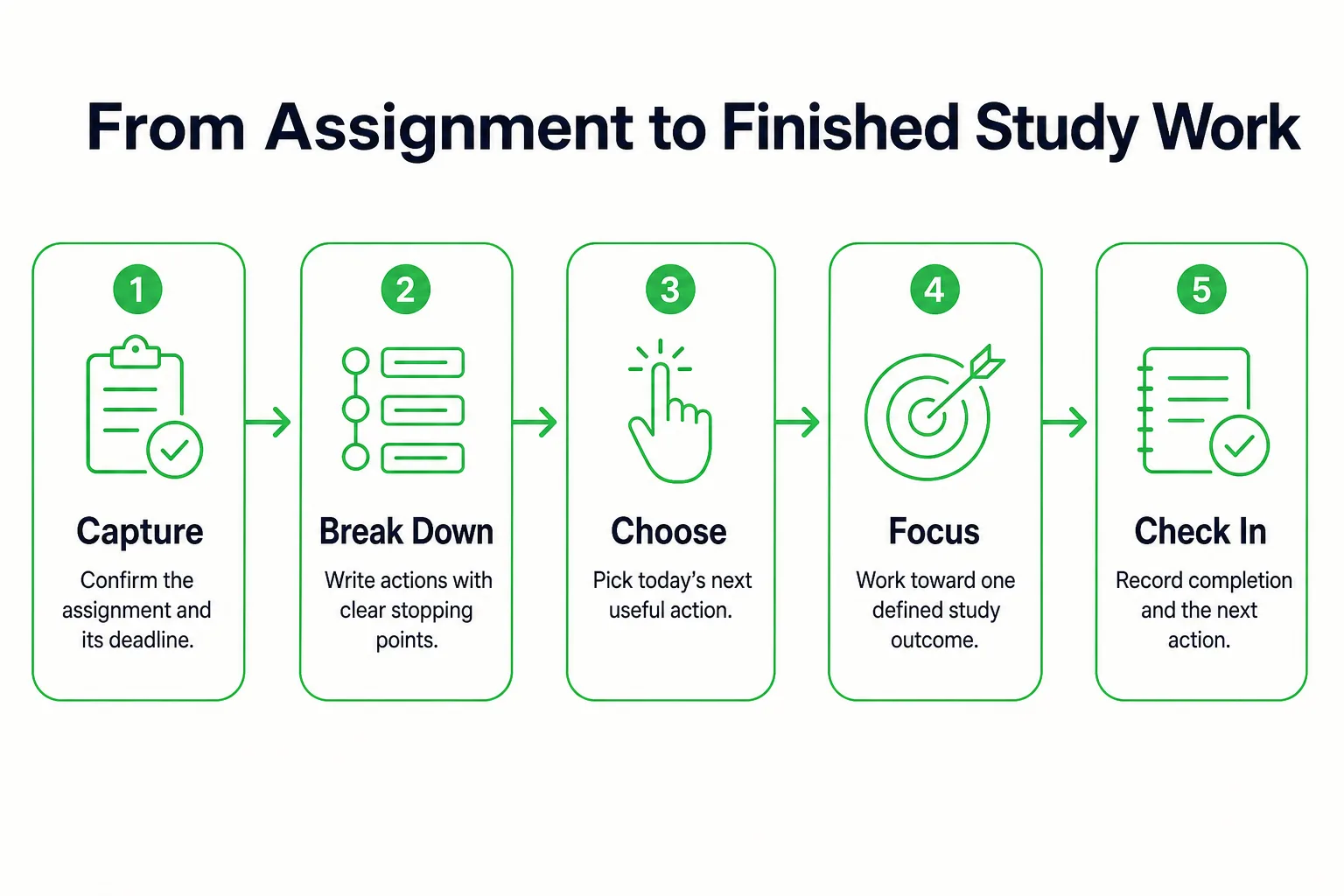
Try this workflow with one assignment today. It takes you from checking the course requirements to recording what you actually finished.
-
Capture the assignment. Add its name and deadline to your task list. Check the course website for the due date, submission method, and any requirements that affect how you will do the work.
-
Break it into actions with clear stopping points. For a short essay, the actions might be choose the question, gather relevant sources, outline the argument, draft, and revise against the rubric. Each action should describe a piece of work you can finish, not the whole essay.
-
Choose today’s priority. Pick the next action that fits the time you have. Add a course tag if it helps separate classes. Keep the larger assignment in the task list, but do not treat the entire essay as today’s next step.
-
Reserve a study block. The University of Washington recommends giving a study task a specific day, time, location, and goal. For example: Tuesday at 3 p.m., at the library, finish the essay outline. Put the block on your calendar and choose the matching task in your list.
-
Start a focus session. Try 25 minutes on the selected action, then decide whether to continue, take a break, or stop. Treat the duration as a starting choice and adjust it to the task. If you want a standalone way to measure elapsed study time, use the browser stopwatch, while keeping the task’s outcome clear.
-
Mark the task complete when its stopping point is reached. If the session ends before the outline is done, leave the task open and record the next unfinished action. Do not mark the entire essay complete just because you worked on it.
-
Finish with a short daily check-in. Note what you completed, what remains, and what you should start next. Keep it brief enough to do after a tiring day of classes.
For Jordan’s Friday history essay, Tuesday’s session might produce a finished outline while the essay itself remains open. Count the outline once. Opening the document and starting the timer are setup steps, not extra study outcomes.
Plan the Whole Week Without Tracking Every Routine
A useful study habit names a behavior, allows for missed days, and fits an ordinary week. Plan the work for each course in your task list, then use a habit tracker for only the few behaviors you want to repeat. You can manage every assignment without turning every part of your day into something to check off.
Use this checklist during your weekly review:
- Review course websites and update changed deadlines.
- Add current assignments and break large ones into next actions.
- Choose the most time-sensitive actions for the coming week.
- Reserve study blocks around classes, work, and other commitments.
- Choose a few essential study habits to track.
- Leave open time for unfinished work and changes to the week.
A manageable habit describes something you can recognize as done. For example, review notes after a particular lecture, prepare materials for the next day, or practice recall on scheduled study days. “Study more” does not tell you what to do or when you have finished.
Let the schedule reflect the week you actually have. Set this week’s routine around your classes, then move a review session if a lab changes. During exams, reduce optional habits and make room for the work with a deadline. Keep weekends different from weekdays when your commitments differ.
If you miss a planned day, resume at the next planned opportunity and replan unfinished assignment work according to its deadline. Do not add extra check-offs to make the record look complete. If you want to track routines without managing assignments in the same system, compare free habit tracker options.
Give Notes, Research, and Review Their Own Place
Give each kind of information a clear home. Your task list says what to do next. Course notes hold explanations and examples. Research materials support papers and projects. Keeping those roles distinct makes it easier to find what you need without maintaining the same assignment queue in several places.
For notes or a course database, use a structure you can repeat in whatever tool you already use: course, topic, class date, notes, and questions to revisit. Keep assignment status in your task system. If a paper needs many sources, a separate citation manager may be useful. Yale University Library describes Zotero as a free tool for collecting, organizing, annotating, citing, and sharing research.
Make review an action, not just time spent looking at notes. MIT Open Learning says periodic retrieval improves recall and remembering. Close your notes and try answering questions about the topic from memory. Then check the material and write down the concepts or answers that need another look.
For a final about 10 weeks away, Carnegie Mellon University suggests spacing review encounters roughly one to two weeks apart. Treat that as an example for that exam horizon, not a schedule for every class or assignment.
Connect the pieces in your study plan: keep lecture material in your notes tool, schedule the next retrieval session, and record the specific questions or concepts to revisit. The task can be “answer the questions on cell transport,” while the notes hold the details you need to check afterward.
Use Progress Displays Without Chasing Empty Check-Offs
Points, streaks, badges, and leaderboards are optional ways to make progress visible. Use them only when they support worthwhile study. They do not tell you whether you learned the material, so define what counts as completed work before you consider any reward.
A finished problem-set section, an essay outline, or a topic reviewed through retrieval can be a meaningful outcome. Opening an app is not the outcome. A filled day shows that you recorded activity; judge academic progress by the work produced and the questions you can answer.
At the end of the week, briefly review completed tasks, unfinished work, focus time, and the next assignment. Look for one change to make in the coming week. You may need to move a study block, split an assignment into clearer actions, or leave more room around a busy day. Adding another tracker is not the default fix.
For example, checking off several tiny setup actions can create more activity than completing a difficult practice set. Keep the practice set as the meaningful unit of work. Count the outcome you intended to complete, not every tap that helped you get there.
Use a leaderboard if it helps you begin useful work. Stop checking it if it starts steering you toward easier tasks for quick rewards. The same goes for streaks: let them record a routine, not decide what work deserves your time.
A year-at-a-glance record can help you notice stretches of activity and gaps. Let the coming week respond to your workload and commitments rather than trying to make every day look identical. Make the work worth recording.
Manage Your Student Study Routine With Loggd
Set Up Your Study Work
Loggd brings habits, tasks, goals, and focus time into one app. Set it up around one current course goal rather than trying to organize the whole semester at once.
- Create an academic goal, such as explaining the main ideas from your biology unit without looking at your notes.
- Add the assignment actions that support it to your task list. Use priorities and course tags to identify the next piece of coursework, not to mark every task urgent.
- Connect the relevant tasks and focus sessions to the goal. That gives each study block a clear reason and lets you see how it fits into the larger piece of work.
- Add only the recurring study behaviors you have chosen. Flexible habit schedules can reflect the coming week’s classes, work shifts, or exam plans, while your task list can still hold all of that week’s coursework.
- Use the focus timer for the next defined study action, then finish with the daily check-in: what you completed, what remains, and what should come next. Keep class meetings and hard deadlines visible on your calendar.
Read Progress as a Record
Each day you check off fills a grid of your last 365 days. Finished work earns points and supports progress through 100 levels, along with streaks, badges, and a leaderboard. Treat those displays as a record of activity, not a measure of learning.
Check off a task when its defined outcome is done. Then review the grid alongside your actual coursework: the useful question is whether you completed work that supports your academic goal, not whether every day looks the same.
If you want a single browser tool for a specific productivity task without signing up, browse Loggd’s free browser tools. They save privately on your device.
Start with one current assignment. Enter its next task, choose the outcome you want from the study session, and start the focus timer.
Sources
- Time management: UW Academic Support Programs
- Managing Time, Learning Strategies Center
- Home - Using Zotero - Yale University Library Research Guides at Yale University
- Proven learning activities that strengthen student learning
- Spaced Practice - Eberly Center