
Digital detox benefits can include more time for sleep, focused work, offline activities, and conversations without checking your phone. Start by reducing one source of distraction and measuring whether that part of your day improves.
A useful detox can target a social media feed, an evening scrolling habit, or repeated phone checks while leaving necessary technology available. You do not have to switch off every device to test a change. Choose one benefit you want, make one specific change, and compare how your days feel and work over time.
Which Digital Detox Benefits Are Worth Looking For?
Treat possible benefits as things to observe, not effects everyone will experience. Pick the change that matters most in your daily life, then look for signs of it in a specific situation.
If alerts and feed checking leave you feeling pulled between demands, try reducing them and notice whether you feel less distracted or more mentally clear. A personal change in stress or anxiety is worth recording, but a detox is not a treatment for a mental health condition.
For sleep quality, keep scrolling out of your bedtime routine. Notice whether you go to bed at a steadier time and feel more rested in the morning. For focus and productivity, choose one task and see whether you can finish it with fewer phone checks. The useful measure is the task completed, not a claim that your attention span has been restored.
For relationships, put your phone away for a meal or conversation and give your attention to the person with you. To make room for physical well-being or a hobby, replace a scrolling window with a neighborhood walk, stretching, cooking, reading, or an outdoor break.
You can also notice whether you open social media intentionally or check it by reflex. Screen time is useful context, but the larger question is what you gained by changing how you used it.
Choose a Break That Matches the Benefit You Want
A useful commitment names a behavior, fits an ordinary day, and includes a way to resume after a missed day. Choose the smallest boundary that directly addresses the problem you want to change.
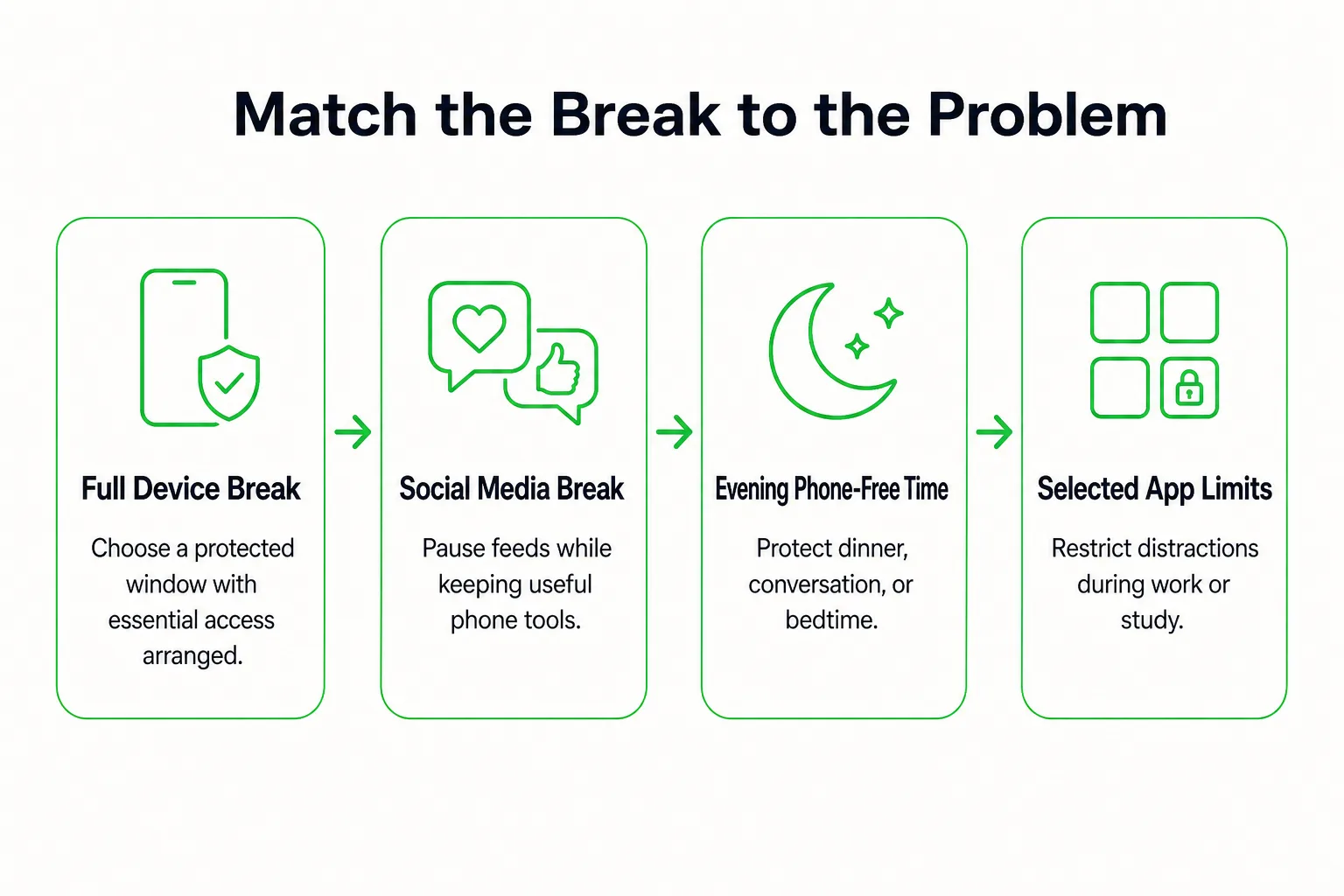
- Full device break: Use this for a protected window when you want a clear stretch away from screens. Keep your phone in another room during dinner.
- Social media break: Choose this if feeds are your main distraction. Open social media only after you finish a planned task.
- Evening phone-free routine: Try this when bedtime scrolling is the concern. Set a time to put the phone away and use the rest of the evening for a book, a conversation, or another quiet activity.
- Limits on selected apps: Use this when work and personal life share a device. Leave distracting apps closed during study or work time, while keeping the tools you need available.
Keep the rule easy to recognize: you either followed it or you did not. If it repeatedly clashes with your responsibilities, adjust it rather than abandoning the whole experiment. If a short, structured break fits your schedule, use the hour-by-hour weekend plan to organize that window.
Keep Essential Phone Uses Available
Before you start, decide which phone functions need immediate access and which can wait for a planned check. Keep required access available throughout the experiment, and check your settings so chosen contacts and necessary alerts can reach you. Test the setup before you begin.
- Emergency calls and chosen contacts can reach me.
- Navigation is available for trips when I need it.
- Work or school requirements are covered.
- Banking and authentication tools are available when needed.
- Healthcare tools and care-related alerts remain accessible.
- I know which messages or updates can wait until my next planned check.
Students and teens can check school requirements and agree on contact arrangements with a parent or caregiver. Adults can let colleagues know when they will be available if a change to phone-checking times affects work.
Keep access to emergency communication, required care, and safety-critical alerts. For example, open navigation for the trip, then put the phone away when you arrive instead of moving into a feed. If you start scrolling unexpectedly, close the app and return to your chosen boundary at the next opportunity.
Measure One Benefit Alongside Screen Time
Check your device’s screen-time history before changing settings, and write down a starting point. If the report separates app use, distinguish distracting apps from useful activities such as navigation or work calls. Pick one outcome that matches your goal, rather than trying to measure everything at once.
Copy this daily log for each day of the experiment:
| Date | Boundary tried | Distracting app time | One chosen outcome | Context note |
|---|---|---|---|---|
For sleep, note bedtime and how rested you feel in the morning. For focus, record phone interruptions and one priority you completed; for emotional experience, choose a plain mood word; or note the minutes you spent on an offline activity. Use the daily mood log if you want to record how you feel at the same time each evening. For a timed reading or work block, the simple stopwatch can mark its beginning and end.
Fewer screen minutes and a better day are separate observations. A day with a long call or necessary navigation may show more screen time while still meeting your boundary. Note unusual workload, illness, or schedule changes so your review reflects what was happening. If opening a tracking tool would invite more browsing, keep the log on paper.
Try a Seven-Day Digital Detox Challenge
Keep the same boundary for all seven days so you can review a recognizable experiment. Adapt the activities to your schedule: students might use homework or library time, teens might arrange something with family or friends, and adults might use lunch or an after-work window.

- Day 1: Record your starting point and choose one boundary. Put an offline replacement where it is easy to reach, such as a book by your chair or walking shoes by the door.
- Day 2: Silence optional notifications. Replace one usual checking window with a ten-minute walk or an accessible seated movement break.
- Day 3: Eat one meal or snack without browsing. If someone is with you, invite a conversation; if you are alone, give your attention to the food or a quiet break.
- Day 4: Protect a 20-minute task or study block. Put your phone out of reach, keep essential access available, and record what you completed.
- Day 5: Use your usual scrolling window for an offline interest, such as drawing, reading, playing music, or cooking.
- Day 6: Arrange a shared offline activity or take a solo outdoor break. If weather or mobility makes that difficult, choose an indoor game or craft instead.
- Day 7: Repeat the replacement that helped most, then review your log. Choose one boundary to continue, adjusting it if it repeatedly got in the way of essential responsibilities.
Choose an activity you genuinely want to make time for with the bucket list maker, then keep that choice handy on paper.
Review What Changes After a Day, Week, and Month
Use the same outcome you chose at the start. The time it takes to notice a useful change depends on the boundary, the benefit you are watching for, and what else is happening in your life. Treat each review point as a prompt to learn, not a deadline for a particular effect.
| Review point | What to look for | What to adjust |
|---|---|---|
| After one day | Was the boundary workable? What prompted checking? Did you do the replacement activity? | Make the rule clearer or easier to follow, and move the replacement within reach. |
| After one week | Look for repeated changes in bedtime, interruptions, mood, completed tasks, or time with other people. Focus on the outcome tied to your original goal. | Keep the boundary if it helps. If it does not, change the target or replacement activity. |
| After two weeks | Does the routine fit both busy and quieter days? Does it repeatedly interfere with an essential responsibility? | Adjust the rule around that responsibility while keeping the intended phone-free time. |
| After one month | Is the boundary still worth its effort? Does it add enough value to your day? | Keep it, loosen it, or replace it with a boundary that better fits your routine. |
If screen time falls but your chosen outcome does not improve, try a different target or replacement activity instead of treating the lower total as success by itself. Note what changed during the experiment, but do not assume reduced screen use caused every change.
Track Digital Detox Benefits With Loggd
You can use Loggd to mark the behavior you are testing, then get back to your day. Create a habit for your chosen phone-free window and set a flexible schedule that matches your week. Check it off when you complete the window.
Add the offline replacement as a task, such as reading during lunch or taking a walk after work. For a planned work or study block, use the focus timer. Loggd brings habits, tasks, goals, and focus time into one app, so the experiment can sit alongside the rest of your plans. Keep the check-in brief, and use your device’s screen-time report for app-use totals.
Use our 7 to 30 day digital detox tracker if you prefer a browser tool for the challenge. It is free, needs no signup, and saves privately on your device. Loggd is free on iPhone, Android, and the web, with no credit card needed. Choose your window and set up its habit today.
Digital Detox Questions
Is three days without a phone enough to reset your brain?
There is no fixed three-day reset point to expect. If you try a phone-free window, pay attention to the specific change you want, such as fewer interruptions or a more consistent bedtime, and review what actually happens.
What are five positive uses of social media worth keeping?
You might keep using it to stay in touch with friends and family, find local events, share creative work, follow useful communities, or coordinate a group activity. Choose the uses that matter to you, and make a rule for the feed or checking habit that gets in their way.
Can a digital detox treat phone addiction or an anxiety disorder?
A digital detox can help you observe and change a phone-use routine. If phone use or anxiety is interfering with daily life, consider talking with a qualified health professional about support. If phone use or anxiety is interfering with daily life, consider talking with a qualified health professional about support.