Use this free weekly work schedule template to put appointments, priority work, breaks, and flexible tasks into one editable week. Copy the grid into Word or a spreadsheet, then save or print it as a PDF if you prefer paper.
The template comes first, followed by format choices, a capacity calculation, and a completed workweek. A schedule gives selected tasks a time window; keep the rest on your task list instead of squeezing everything into the calendar. This template is for planning your own workweek. If you arrange employee shifts, you can adapt the columns for names and coverage, while checking availability, required coverage, and applicable break and overtime rules.
Copy Your Weekly Work Schedule Template
Copy this weekly work planner into the editor you prefer. Fill in the details that shape your availability before placing work in the grid.

Week of:
Work hours:
One weekly outcome:
Personal commitments that affect availability:
| Time | Monday | Tuesday | Wednesday | Thursday | Friday |
|---|---|---|---|---|---|
| 9:00 to 9:30 | |||||
| 9:30 to 10:00 | |||||
| 10:00 to 11:00 | |||||
| 11:00 to noon | |||||
| Noon to 1:00 | |||||
| 1:00 to 2:00 | |||||
| 2:00 to 3:00 | |||||
| 3:00 to 4:00 | |||||
| 4:00 to 5:00 |
Replace the sample hours with your actual work window. Rename days for a rotating schedule, and split or merge rows around real appointments. Add weekend columns only if those are working days. To sketch recurring commitments before filling in this week's grid, start with the ideal week planner.
Flexible tasks and time estimates:
Small daily habit cue:
Work stopping time:
Unfinished items to review:
Use a short entry key: Fixed for appointments, Priority for selected deliverables, Flex for movable work, Break for time away, and Buffer for unexpected work. Keep a habit as a brief cue, not another task inventory. Put personal appointments in the work hours when they reduce your availability. Downtime outside the work window can stay in the footer.
Choose Word, PDF, or a Spreadsheet
Choose the format based on how you expect to use your weekly schedule template.
| Format | Editing | Printing | Sharing | Reuse |
|---|---|---|---|---|
| Word | Good for notes and layout changes. Added text can move rows or page breaks. | Check print preview after editing. | Useful for sending a settled document. | Save a blank master and copy it each week. |
| Best for keeping a settled layout. Edit the original document before exporting again; a PDF is not automatically fillable. | A stable choice for a printable weekly work schedule. | Convenient for sharing a settled version. | Export a fresh copy from your editable original. | |
| Excel or another spreadsheet | Useful for repeatable grids and hour totals. Check formulas after changes. | Wide sheets may need landscape orientation or scaling. | Share a copy of the sheet when others need to see it. | Duplicate the blank worksheet for each week. |
Set landscape orientation if the columns need more room, then check that the whole week fits legibly on the page. A weekly schedule template in Word can be exported as a weekly schedule template PDF. For a schedule template Excel users can reuse, paste the same grid into a worksheet.
 Loggd · by the makers of this blog
Track your habits, tasks and goals in one free app.
Every day you check off fills in a grid of your last 365 days, so you can see if you are getting better.


Free plan with no time limit. No credit card.


Calculate Your Available Work Hours
Start with the hours you can actually plan. Then subtract fixed commitments, breaks, routine administration, and time set aside for unexpected work.
Example: 40 hours in the weekly planning window − 7 hours of meetings − 5 hours of breaks − 3 hours of administration − 5 hours of buffer = 20 hours for priority and flexible tasks.
This example uses five 9:00 a.m. to 5:00 p.m. planning windows, including lunch. Use your actual availability, and keep the planning window separate from paid hours. If personal appointments shorten a workday, subtract that time before setting your task budget.
Count each block once. Administration covers routine messages and processing. Meetings belong under fixed commitments. Neither should also be counted in the hours available for tasks.
Choose a buffer by looking at interruptions and incoming requests from a recent, ordinary week. Adjust it to fit your work. If the time you estimate for tasks exceeds your capacity, reduce the scope, agree on a later deadline, delegate, or leave some work off this week’s schedule. Once the hours fit, use the energy management guide to decide when to place your most demanding work.
Fill the Week Without Exceeding Capacity
Say your week runs from 9:00 a.m. to 5:00 p.m., and you need to draft a proposal, finish a report, and leave room for routine requests. In this example, lunch is noon to 1:00 every day, the buffer is 4:00 to 5:00 every day, and administration is 9:00 to 9:30 each day except Wednesday, when it runs 9:00 to 10:00.
| Day | Fixed Meetings | Priority Work | Flexible Work |
|---|---|---|---|
| Monday | 10:00 a.m.-noon | Proposal: 9:30-10:00 a.m. and 1:00-3:30 p.m. (3 hours) | 3:30-4:00 p.m. (30 minutes) |
| Tuesday | 10:00-11:00 a.m. | Proposal: 9:30-10:00 a.m. and 1:00-3:30 p.m. (3 hours); report: 11:00 a.m.-noon (1 hour) | 3:30-4:00 p.m. (30 minutes) |
| Wednesday | 10:00-11:00 a.m. | Report: 11:00 a.m.-noon and 1:00-3:00 p.m. (3 hours) | 3:00-4:00 p.m. (1 hour) |
| Thursday | 10:00 a.m.-noon | Revisions: 9:30-10:00 a.m. and 1:00-2:30 p.m. (2 hours) | 2:30-4:00 p.m. (90 minutes) |
| Friday | 10:00-11:00 a.m. | Revisions: 11:00 a.m.-noon; weekly review: 1:00-2:00 p.m. (2 hours total) | 9:30-10:00 a.m. and 2:00-4:00 p.m. (2.5 hours) |
The accounting is exact: 14 hours of priority work, including the weekly review, plus 6 hours of flexible work uses the 20-hour task budget. Meetings, breaks, administration, and buffer fill the other 20 hours.
Choose flexible tasks from your task list by estimated duration and deadline. The schedule offers six hours for them, not a promise that every task on the list will fit. NIMH recommends deciding what must get done now and what can wait. If your proposal has several dependent pieces, use the project work plan template to break it into actions before reserving calendar blocks.
Give Goals and Habits a Small Place
A useful weekly commitment names an action and fits the hours your ordinary week actually has. Connect a longer-term goal to a concrete deliverable already on the schedule. If your goal is to submit a proposal, this week’s outcome might be a complete draft, with the proposal blocks reserved for that work. If you need help choosing which longer-term outcome this week’s deliverable should support, use the 12 Week Year planner.
Give one small daily habit a cue beside work you already do. For example, review tomorrow’s first task before you stop for the day. Count those minutes inside an existing administration block, rather than treating them as extra capacity.
Write a stopping time in the template footer. Protect personal appointments by reducing the work window before you allocate tasks. OSHA notes that demanding work schedules can increase fatigue, stress, and difficulty concentrating.
If you miss a day of the short habit, use its next scheduled cue. For unfinished work, estimate what remains before assigning it another block.
Adjust the Schedule When New Work Arrives
Use buffer time for unexpected work first. If a request takes longer than the buffer you have, identify which scheduled task would move before you accept it. That makes the tradeoff visible instead of quietly adding hours to your day.
For example, a two-hour request arrives for Thursday. Use Thursday’s one-hour buffer, then replace one hour of flexible work. Put the displaced flexible task back on the unscheduled task list; give it a new time only if capacity allows.
If the request would displace priority work or a fixed commitment, discuss the scope or timing with the person involved. Do not silently extend your workday to fit it. When a task finishes early, choose a flexible task that fits the open interval, or leave the time open.
Keep daily updates brief: mark finished blocks, revise the time remaining for active work, and check your next appointment. If recurring requests should stay outside your week, use the not-to-do list builder to write down a clear boundary.
Decide What Happens to Unfinished Work
Use Friday’s review block to check unfinished tasks alongside next week’s appointments. Estimate the work that remains, rather than carrying over the original estimate. Then choose what to do with each item:
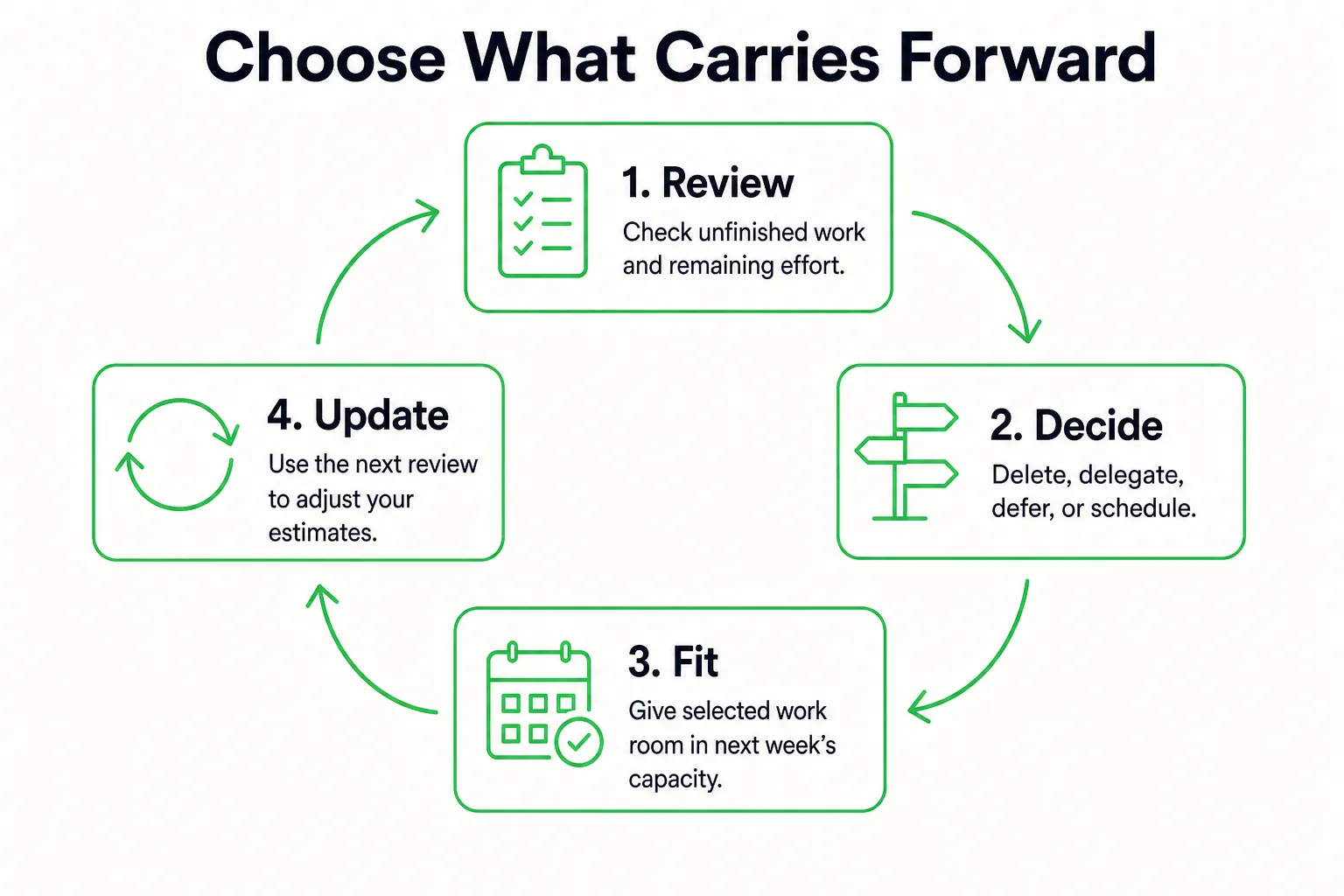
- Delete work that no longer serves a need.
- Delegate it with a clear handoff and expected result.
- Defer it with a revisit date or a condition for reconsidering it.
- Schedule a defined next action inside next week’s available capacity.
For example, if a proposal revision needs 90 more minutes, write down the remaining action and reserve 90 minutes next week only after subtracting that week’s commitments. If the budget is full, remove or defer another candidate before adding the revision. Do not automatically put every unfinished item on Monday.
If you are waiting on someone else, add a follow-up task or check date. A large block labeled with the whole stalled project does not show what you can do now. Keep the next action specific, such as checking for a response or revising a section once feedback arrives.
Compare your estimates with the blocks you actually used. If routine tasks took longer than expected, adjust their durations next week. If interruptions used most of the buffer, consider reserving more; if the buffer stayed open, you may be able to reserve less. The schedule gets more useful when it reflects what your week showed you.
If you also need to collect loose notes, messages, and waiting items before choosing next week’s work, use the weekly review checklist. Save a dated copy of this week, then start the next version from your blank master and carry forward only the work you deliberately chose.
Sources
- Caring for Your Mental Health - National Institute of Mental Health (NIMH)
- Long Work Hours, Extended or Irregular Shifts, and Worker Fatigue - Hazards | Occupational Safety and Health Administration